
Call for Papers
OpenSession's CFP forms are written in MDX, a format that combines Markdown with
interactive components. This gives you full control over the form layout, instructions,
and field logic without a visual drag-and-drop builder.
How speakers experience it
Speakers visit a public URL like
opensession.dev/submit/your-event/call-for-papers.
They sign in with email or Google, fill out the form, and submit. The flow is simple:Speaker opens CFP link Fills out the form Reviews and submits ┌─────────────────────┐ ┌─────────────────────┐ ┌─────────────────────┐ │ Public URL │ ───────│ Title, abstract, │ ───────│ Confirmation page │ │ Account sign-in │ │ track, format, │ │ Email notification │ │ Welcome message │ │ co-speakers, files │ │ Draft auto-saved │ └─────────────────────┘ └─────────────────────┘ └─────────────────────┘
Drafts auto-save as the speaker types. If they close the browser and come back later,
their progress is preserved. Each speaker can submit up to 3 talks per event.
The MDX form engine
Every form is a single MDX document stored as an immutable FormVersion. When you edit
a form, OpenSession creates a new version. Submitted responses are always pinned to the
exact version the speaker saw, so changing the form later never breaks existing submissions.
Available field components
| Component | What it does |
<TextField> | Single-line or multiline text input with optional character limit |
<RichText> | Long-form text area for abstracts and descriptions |
<Select> | Dropdown tied to event tracks, formats, or custom option lists |
<Checkbox> | Multiple choice with checkboxes |
<Radio> | Single choice with radio buttons |
<FileUpload> | File upload stored in Cloudflare R2. Accepts images, PDFs, slides |
<Participants> | Multi-speaker block. Repeats child fields for each co-speaker |
<Section> | Visual grouping with a title |
<Info> | Read-only instruction text |
Free Markdown between components becomes the welcome copy, instructions, or section
descriptions. You control the entire reading experience.
Conditional logic
Show or hide fields based on the speaker's answers. The
<Show> component evaluates
an expression against the current form values:<Select name="format" label="Talk format" options={formats} required /> <Show when={values.format === 'workshop'}> <TextField name="workshopDuration" label="How long is your workshop?" required /> <TextField name="workshopRequirements" label="What do attendees need to bring?" /> </Show>
The same conditional logic runs on the server during validation. A hidden field cannot
be submitted even if the speaker tampers with the request.
Multi-speaker support
The
<Participants> component lets speakers add co-presenters. Each participant gets
their own name, email, and bio fields:<Participants min={1} max={3}> <TextField name="speaker.firstName" label="First name" required /> <TextField name="speaker.lastName" label="Last name" required /> <TextField name="speaker.email" label="Email" required /> <RichText name="speaker.bio" label="Bio" maxLength={500} /> </Participants>
Co-speakers added by email get unlinked speaker records. When they sign in with a verified
account using the same email, their account automatically links to the existing record.
The form editor
The admin panel includes a Monaco editor (the same editor used in VS Code) with a
live preview. You edit MDX on the left and see the rendered form on the right. Field
name changes are flagged as warnings to prevent accidental data loss.

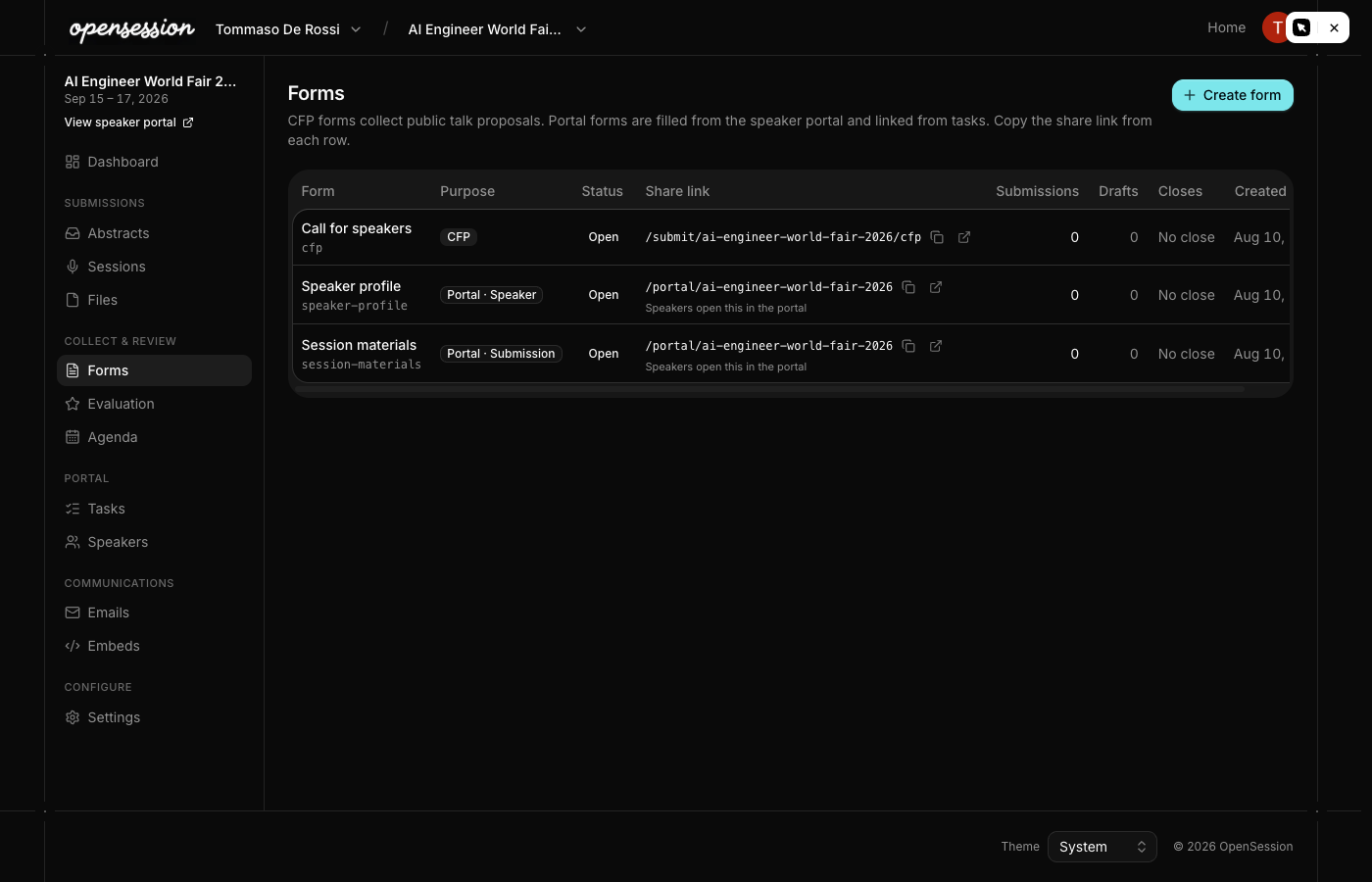
Default forms
Every new event starts with three pre-built forms:
| Form | Purpose | Default status |
| Call for Papers | Session title, abstract, track, format, co-speakers | Draft |
| Speaker Profile | Name, bio, job title, company, headshot, social links | Open |
| Session Materials | Slides, cover image, A/V requirements | Open |
These are regular MDX forms, not hardcoded templates. You can edit the wording, add
custom questions, reorder fields, or delete entire sections.
Server-side validation
When a speaker submits, the server re-renders the form with the submitted values to
determine which fields were visible under the same conditional logic. Then it validates:
- Required fields that were visible must have values
- Character limits are enforced
- Select options are validated against real track and format IDs
- Unknown field names are rejected
- Submission limit of 3 per speaker per event is enforced
This prevents tampered submissions from bypassing conditional logic or injecting
unexpected data.